
Object detection & AI backends
Object detection finds people, vehicles, and animals in the frame, and is the basis for faces, license plates, and semantic search. It runs on an AI backend you choose to match your hardware.
Choosing a backend
camera.ui ships six AI backends as plugins. Pick the one for your hardware and enable it per camera in Settings → Plugins (see Set up sensors):
- CoreML. For Apple Silicon Macs; uses the GPU and Neural Engine.
- OpenVINO. For Intel CPUs and GPUs.
- ONNX. Cross-platform, on CPU or a supported GPU.
- NCNN. A lightweight backend for supported hardware. (No semantic search.)
- Coral. For a Coral Edge TPU, with a CPU fallback. Linux only.
- Hailo. For a Hailo-8 / Hailo-8L accelerator. Linux only.
CoreML, OpenVINO, ONNX, and NCNN provide object, face, and license-plate detection, and person re-identification and segmentation for finding an object. CoreML, OpenVINO, and ONNX also provide CLIP for semantic search. Coral and Hailo are edge-AI accelerator backends that provide object detection only (no faces, license plates, or CLIP).
Models and confidence
In a backend's plugin settings you choose a model for each task (object, face, license plate, segmentation, CLIP). Larger models are more accurate but heavier. camera.ui downloads the models it needs automatically.
Confidence is not set here but per camera in Settings → Detection, for object, face and plate detection alike, and a change takes effect right away. Objects have one value per type, each between 0.3 and 1: Person Confidence, Vehicle Confidence and Animal Confidence.
The backend reports everything from 0.25 up. Below your value a detection never starts an event, a notification or a sensor state, it only helps camera.ui keep following an object it already tracks.
Which object types a camera reports is set in its object zones. Motion and audio are not affected.
Next to the confidence values is Object timeout, in seconds (minimum 10, default 15). It only matters for cameras that report objects on their own, like many Reolink models: it caps how long such a detection stays active when the camera never sends an end signal. Frame-based backends ignore it.
Below it is Ignore stationary objects, on by default, see Stationary objects.
Where detection looks
A detection model works on a small square, often 640 pixels. Squeezed into it, a 4K frame leaves a person at the end of the driveway a few pixels tall. camera.ui instead cuts the moving areas out of the full-resolution frame, several per frame if the movement is spread out, runs the model on those and maps the boxes back onto the picture, so small and distant objects get found. Nothing to set up.
When nothing is moving, the whole frame goes through. The Zoom column in the metrics below shows how often a camera worked this way.
What detection costs
Metrics → Cameras shows two tables. The first is the process table, one row per camera, with CPU and memory. The second, Detection, shows where the time goes:
- Decode, the time for one frame: analysis stream first, then the high-resolution stream.
- Processing, scaling to the model input and turning the results back into boxes. On a camera without an object detector it shows the scaling for motion.
- Transport, the time the frame and the result spend on the way to the plugin and back.
- Analysed, frames per second analysed, again analysis stream then high-resolution stream.
- Active, the share of time the camera analysed at all. A camera with a frame loop sits at 100%, a camera that reports motion itself only counts during events.
- Detections, objects found per analysed frame.
- Zoom, the share of object detections that looked at zoomed motion windows instead of the whole frame, with the number of windows per zoomed frame behind it.
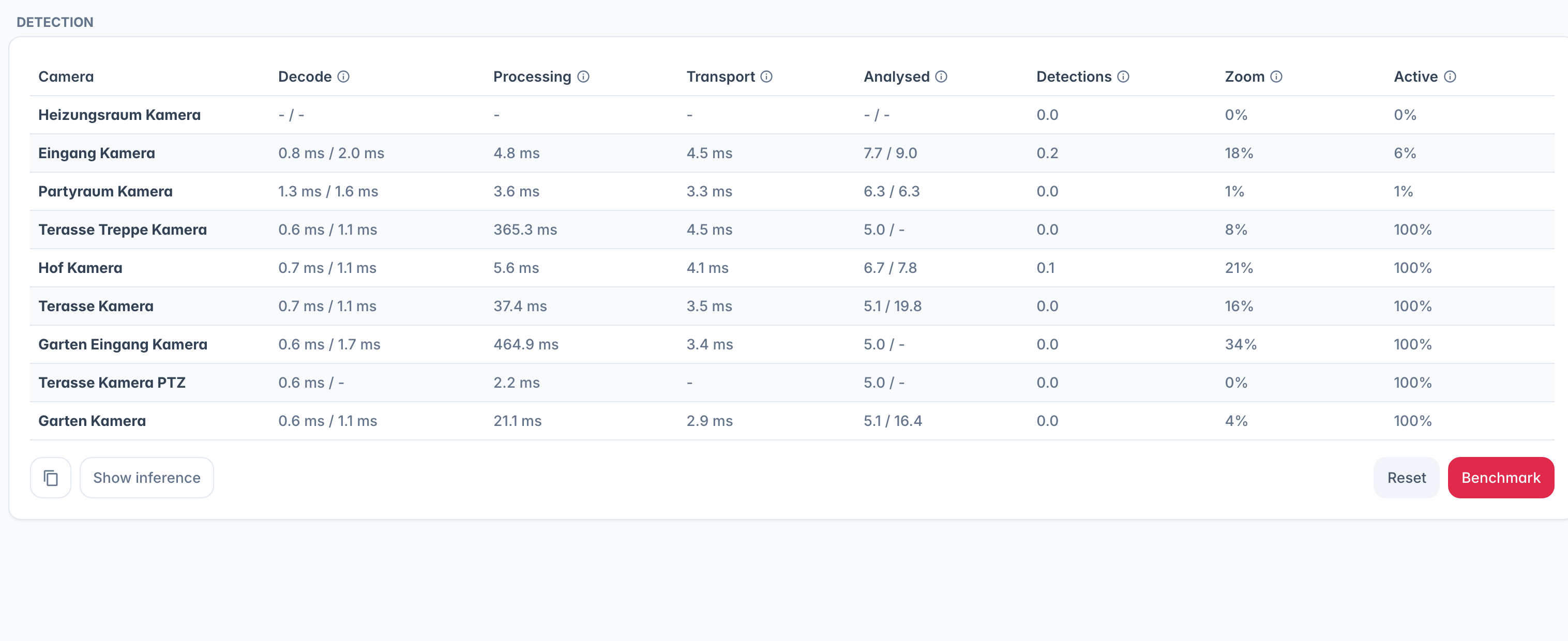
Show inference switches the same table to the time inside each detector: Motion, Object, Face, Recognition, Re-ID, Plate, Classifier and CLIP. Point at a cell to see the plugin, the model and the device it runs on, and a camera running on a worker names that worker. Values are averages since the camera started; use Reset after changing a model. Copy puts both views for every camera on the clipboard as text.
Benchmark
Benchmark loads the object detector of the cameras you pick with test frames and reports how many detections per second the machine manages, in total and per camera, with each camera's plugin, model and device. Copy puts the result on the clipboard.
Detection pauses on every camera while the run is going, including the ones you did not pick, and continues when it is done. Only admins can run it.
Object assist
Some cameras detect objects on their own but report only that they saw something, not where in the frame it is. Many Reolink models work this way. That leaves face and license-plate recognition nothing to zoom in on, so they rarely find anything.
Under the camera's Plugins tab, pick an Object Assist plugin below Object. It is a second detector that locates the person or vehicle in the frame, so face and plate recognition get a proper crop to work on. See Set up sensors.
Camera detection as a second opinion
Detection needs more than one sighting, so a person seen only for a moment (behind a fence or a clothesline) is dropped as a flicker. If the camera also detects objects on its own (a camera plugin that reports people or vehicles, like the Reolink plugin or ONVIF analytics) while a backend here does the detection, a camera report of the same kind of object at the same moment confirms that glimpse, and the card shows its picture. The camera's report never creates a detection by itself. Nothing to set up.
What you get
Detected objects appear on the live view as boxes, drive notifications, and become events you can browse and filter by type. They also feed face recognition, license plates, and semantic search. A heatmap overlay on the player shows where objects were detected most often over a time window.